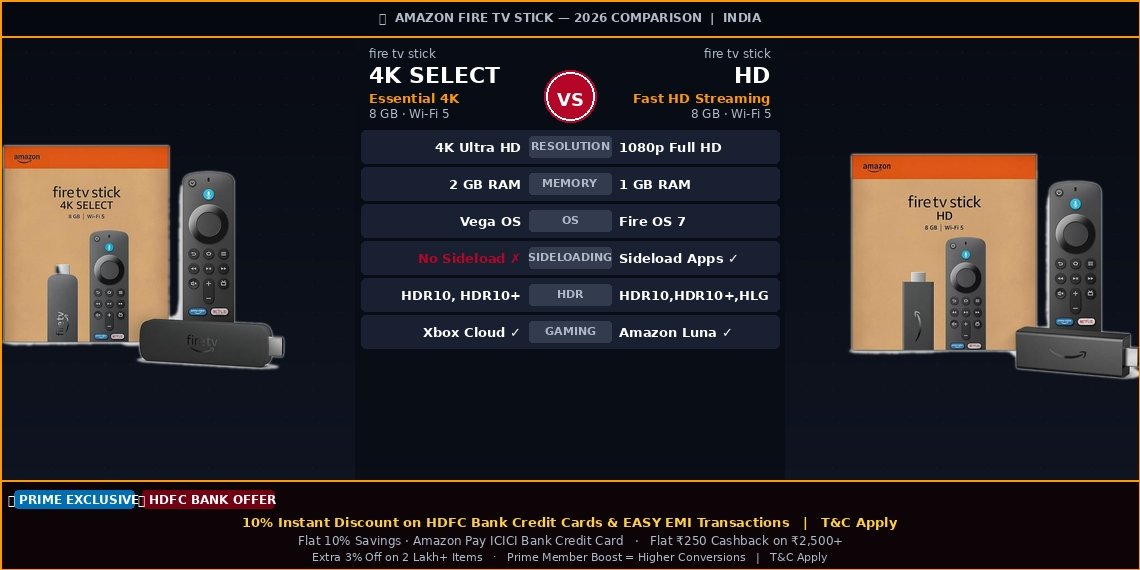

Amazon Fire TV Stick HD vs Fire TV Stick 4K Select, Which One Should You Buy in 2026?
In this comparison I am going to cover everything you need to know about the Fire TV Stick HD and the Fire TV Stick 4K Select — resolution, RAM, operating system differences, Dolby support, sideloading, gaming, and which one is actually worth your money in India in 2026.
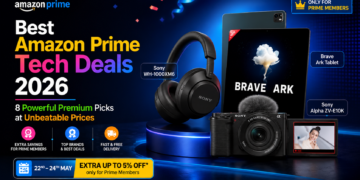
Amazon Fire TV Stick Sale Offers — Best Deals Available Right Now with Amazon Great Summer Sale
Before you buy, here are the best offers currently available on Amazon India for both the Fire TV Stick HD and the Fire TV Stick 4K Select. These deals can save you a good amount on top of the already competitive prices.


HDFC Bank Credit Card holders get an instant 10% discount on both Fire TV Stick models. This offer is also valid on HDFC EASY EMI transactions. Terms and conditions apply.
If you are an Amazon Prime member, you get an exclusive Prime Member Boost on top of regular sale pricing — which means higher savings compared to non-Prime buyers. Prime members also get a flat 10% savings with the Amazon Pay ICICI Bank Credit Card on eligible purchases.
There is also a flat ₹250 cashback available on a minimum purchase of ₹2,500, plus an extra 3% off on over 2 lakh items across Amazon India. Terms and conditions apply on all these offers.
How to Get the Best Price on Amazon Fire TV Stick in India
To get the maximum discount on the Amazon Fire TV Stick HD or the Fire TV Stick 4K Select, I recommend using your HDFC Bank Credit Card or Amazon Pay ICICI Bank Credit Card at checkout. Make sure you are logged in as an Amazon Prime member before placing the order to unlock the Prime Member exclusive pricing. Stack these offers and you end up paying significantly less than the listed price.
My Honest Comparison to Help You Pick the Right One
I have used both the Amazon Fire TV Stick HD and the Fire TV Stick 4K Select and I can tell you honestly — the one that looks better on paper is not always the better buy for everyone.
The price difference between these two sticks is small but the differences inside are quite significant. One runs a completely new operating system that removes sideloading. The other is limited to Full HD but gives you more freedom. In this comparison I am going to break everything down in simple language so you can make the right decision for your TV and your usage without any confusion.
The Fire TV Stick 4K Select launched in October 2025 with Amazon’s brand new Vega OS replacing the older Android-based Fire OS. If you were comparing this with older guides from 2024, the OS change is the biggest update you need to know about before buying in 2026.
Things I Think You Should Know Before Buying
- The 4K Select gives you 4K but takes away Dolby Vision and Dolby Atmos This surprised me honestly. For a 4K device, not having Dolby Vision is a real compromise — especially if you watch Netflix or Prime Video content that streams in Dolby Vision on other devices. The HD stick actually supports HLG which the 4K Select drops too.
- Vega OS on the 4K Select means you cannot sideload any app This is the biggest change in 2025-2026. Amazon moved the 4K Select to Vega OS which is built on Linux — not Android. It looks the same as the old Fire OS but you cannot install any app that is not on the official Amazon App Store. No Kodi, no third-party streaming apps, nothing outside Amazon’s store.
- Both sticks have Wi-Fi 5 — the 4K Select does not upgrade to Wi-Fi 6 I was surprised to find this. Many people assume the newer and pricier stick gets Wi-Fi 6 — it does not. If you want Wi-Fi 6 on a Fire Stick you need to step up to the 4K Max which costs more.
- The 4K Select has 2GB RAM which makes it genuinely faster day to day In my use I found the 4K Select noticeably smoother for navigating the interface and switching between apps — even on a Full HD TV. The extra RAM does make a real difference in how snappy everything feels.
- I would not buy the 4K Select if my TV is Full HD There is simply no point paying extra for 4K capability that your TV cannot display. If you have a 1080p TV, the Fire TV Stick HD is the smarter and more honest purchase — period.
Fire TV Stick HD vs Fire TV Stick 4K Select — Complete Spec Comparison
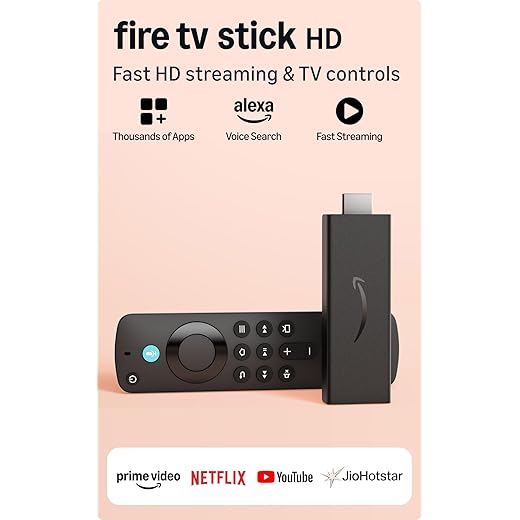 Best for Full HD TVs Fire TV Stick HD | VS | 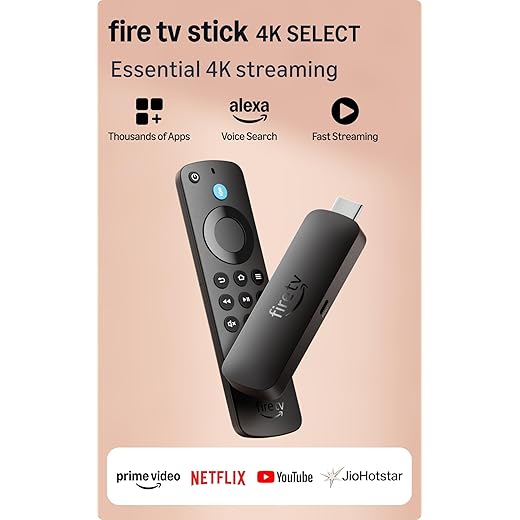 Best for 4K TVs Fire TV Stick 4K Select |
|---|---|---|
4.1 | My rating |
4.3 |
1080p Full HD 60fps | Max resolution |
4K Ultra HD 60fps |
1GB | RAM |
2GB |
8GB | Storage |
8GB |
Wi-Fi 5 | Wi-Fi |
Wi-Fi 5 |
HDR10, HDR10+, HLG | HDR support |
HDR10, HDR10+ |
No | Dolby Vision |
No |
No | Dolby Atmos |
No |
Fire OS 7 — Android | Operating system |
Vega OS — Linux |
Yes | Sideloading apps |
No |
No | Xbox Cloud Gaming |
Yes |
₹ 2,999 | Price |
₹ 3,999 |
| Buy Now | Buy Now |
Fire TV Stick HD — My Review
The most affordable way to get the full Amazon Fire TV experience in India. Streams in Full HD 1080p at 60fps with HDR10 support, runs on Android-based Fire OS 7, and comes with Alexa Voice Remote that controls your TV’s power and volume too.
| Max Resolution | 1080p Full HD at 60fps |
| Processor | 1.7 GHz Quad-Core |
| RAM | 1GB |
| Storage | 8GB |
| Wi-Fi | Wi-Fi 5 Dual-Band |
| Bluetooth | Bluetooth 5.0 + LE |
| HDR Formats | HDR10, HDR10+, HLG, VP9 |
| Audio | HDMI Dolby Audio Passthrough |
| Operating System | Fire OS 7 (Android-based) |
| Sideloading | Supported |
- Most affordable Fire TV stick available in India right now — very good value for a Full HD TV
- Runs Fire OS 7 on Android so I can sideload apps outside the Amazon App Store — a big deal for many users
- Supports HDR10, HDR10+, HLG, and VP9 which is actually a better HDR lineup than the more expensive 4K Select
- Alexa Voice Remote controls my TV power, volume, and mute — no need to juggle two remotes
- Supports Miracast and WiDi so I can mirror my Windows laptop screen directly to my TV
- 1.7 GHz quad-core chip is fast enough for smooth HD streaming without any buffering or lag
- Fire OS 7 has the widest app support and I can even install apps not available on Amazon’s official store
- Limited to 1080p — if I ever upgrade to a 4K TV I will have to buy a new streaming stick
- Only 1GB of RAM which makes app switching and menu navigation a little slower than I would like
- No Dolby Vision support — HDR experience is decent but not premium level
- No native Dolby Atmos — only HDMI passthrough of Dolby-encoded audio
- Micro-USB power port feels outdated in 2026 — I wish Amazon had switched to USB-C by now
If my TV is Full HD and I am not planning to upgrade to 4K anytime soon, this is genuinely the smartest buy in Amazon’s Fire Stick lineup. I get everything I need for clean 1080p streaming, a solid Alexa remote, and the freedom to sideload apps — all at the lowest price in the range.
Fire TV Stick 4K Select — My Review
Amazon’s most budget-friendly 4K streaming stick running the new Vega OS. Streams in 4K Ultra HD at 60fps, supports HDR10 and HDR10+, has 2GB RAM for smoother performance, and adds Xbox Cloud Gaming support — all at a price close to the HD model.
| Max Resolution | 4K Ultra HD at 60fps |
| RAM | 2GB |
| Storage | 8GB |
| Wi-Fi | Wi-Fi 5 Dual-Band |
| Bluetooth | Bluetooth 5.0 |
| HDR Formats | HDR10, HDR10+ |
| Audio | HDMI Dolby Audio Passthrough |
| Operating System | Vega OS (Linux-based) |
| Sideloading | Not Supported |
| Xbox Cloud Gaming | Supported |
- 4K Ultra HD streaming at 60fps — I can see the difference on my 4K TV and it is genuinely sharper and more detailed
- 2GB RAM makes the interface noticeably snappier — menus load faster and switching between apps feels much smoother
- New Vega OS is quick and responsive in daily use — Amazon has done a good job making it fast even on a budget device
- Xbox Cloud Gaming support is a nice bonus — I can stream Xbox games on my TV without owning a console
- HDR10 and HDR10+ deliver good colour and contrast for HDR content on Netflix and Prime Video
- Comes with the same Alexa Voice Remote as the HD model — TV power, volume, and mute controls all work fine
- No sideloading at all on Vega OS — this is a dealbreaker for me if I use apps outside the Amazon App Store
- No Dolby Vision which I honestly did not expect on a 4K device — Netflix and Prime Video content in Dolby Vision will not play in Dolby Vision on this stick
- No native Dolby Atmos — same HDMI passthrough situation as the cheaper HD model which makes the audio difference minimal
- Wi-Fi 5 only — no upgrade to Wi-Fi 6 despite being the newer and pricier stick
- Drops HLG support compared to the HD model which is actually a step backward for HDR format coverage
- Same 8GB storage as the HD model — no extra room for more apps
If I have a 4K TV and I do not rely on sideloading, the 4K Select is worth the small extra cost over the HD model. The jump from 1GB to 2GB RAM alone makes the daily experience smoother and the 4K picture is genuinely better on a 4K screen. But I would not buy this if I need Dolby Vision or if I use apps outside the Amazon App Store — the HD model or the older 4K 2nd Gen would be the smarter choice in that case.
It does not support either. Amazon removed both Dolby Vision and native Dolby Atmos to keep the 4K Select price low. The HD stick actually covers HDR10, HDR10+, and HLG — while the 4K Select drops HLG from that list.
If I watch a lot of Dolby Vision content on Netflix or Prime Video, the 4K Select will not play it in Dolby Vision. I need to step up to the Fire TV Stick 4K 2nd Gen for that.
Both sticks run on Wi-Fi 5. The 4K Select does not get a Wi-Fi upgrade despite costing more. Wi-Fi 6 is only available on the Fire TV Stick 4K Max which is priced significantly higher.
Wi-Fi 5 is fine for most home setups in India — but if someone is upgrading specifically hoping for better connectivity, they will be disappointed.
Vega OS looks almost identical but it is built on Linux, not Android. The one thing that changes my experience completely is that sideloading is not possible at all — any app outside Amazon’s App Store cannot be installed.
For users who sideload apps like Kodi or third-party streaming tools, the 4K Select is a downgrade from older Fire TV devices even though it costs more.
My Answers to Common Doubts About These Two Sticks
Which Fire TV Stick should I buy if my TV is Full HD?
Buy the Fire TV Stick HD without any second thought. The 4K Select’s main advantage is 4K resolution which your Full HD TV simply cannot show. You would be spending extra money for zero visible benefit. The HD model gives me the full Fire TV experience at a lower price and I also get sideloading support which the 4K Select does not have.
Is the Vega OS on the 4K Select a problem for regular users in India?
For most regular users in India who stick to official apps — Netflix, Prime Video, YouTube, JioCinema, Hotstar, SonyLIV — Vega OS will work perfectly fine. All these apps are available on Amazon’s App Store. The issue is only if someone wants to install apps outside that store, which Vega OS completely blocks. If I rely on sideloading, I stay away from the 4K Select.
Does the Fire TV Stick 4K Select support Dolby Atmos and Dolby Vision?
No and this genuinely surprised me. For a 4K streaming stick, not having Dolby Vision is a real gap. It also does not support native Dolby Atmos — just HDMI audio passthrough like the cheaper HD model. If Dolby Vision and Atmos matter to me, I look at the Fire TV Stick 4K 2nd Gen or the 4K Max which include full support for both.
Can I use either of these sticks for gaming?
The Fire TV Stick 4K Select supports Xbox Cloud Gaming which lets me stream Xbox games directly on my TV without owning a console — which I find to be a genuinely useful feature. The HD stick does not support Xbox Cloud Gaming. Both sticks support Amazon Luna, Amazon’s own gaming service where I can play a selection of games via subscription or individual purchase.
Is it worth spending more on the 4K Select over the HD model?
It depends entirely on my TV. If my TV is 4K, then yes — the extra money buys me a noticeable picture upgrade, more RAM, and Xbox Cloud Gaming. If my TV is Full HD, then no — the HD model is the better and more honest purchase for me and I save money without giving anything up.
Which Fire TV Stick Should You Buy in 2026?
- My TV is Full HD — buy the Fire TV Stick HD, it is the smarter and cheaper pick
- My TV is 4K and I only use official apps — buy the Fire TV Stick 4K Select for the picture and RAM upgrade
- My TV is 4K and I need Dolby Vision or Dolby Atmos — skip both and buy the Fire TV Stick 4K 2nd Gen
- I use sideloaded apps — the Fire TV Stick HD or the older 4K models, not the 4K Select
After comparing both sticks side by side, my honest answer is this — buy based on your TV, not the spec sheet. The Fire TV Stick HD is the smarter buy for Full HD TV owners and it even wins on app flexibility thanks to sideloading support. The Fire TV Stick 4K Select is the right call for 4K TV owners who stick to official streaming apps and want a smoother, sharper experience. But if I need Dolby Vision, Dolby Atmos, or full sideloading on a 4K device, neither of these two sticks is the right answer — the Fire TV Stick 4K 2nd Gen or 4K Max is what I would look at next.